
Create a return authorization
Authorize a buyer to send books back, buy the prepaid return label, email the buyer, and record what arrived.
A return authorization is your record that a buyer should send books back: which copies, where they go, the prepaid label you pay for, and what you did with each book when it arrived. It moves books, never money; refund the buyer separately (see Refunds and returns).
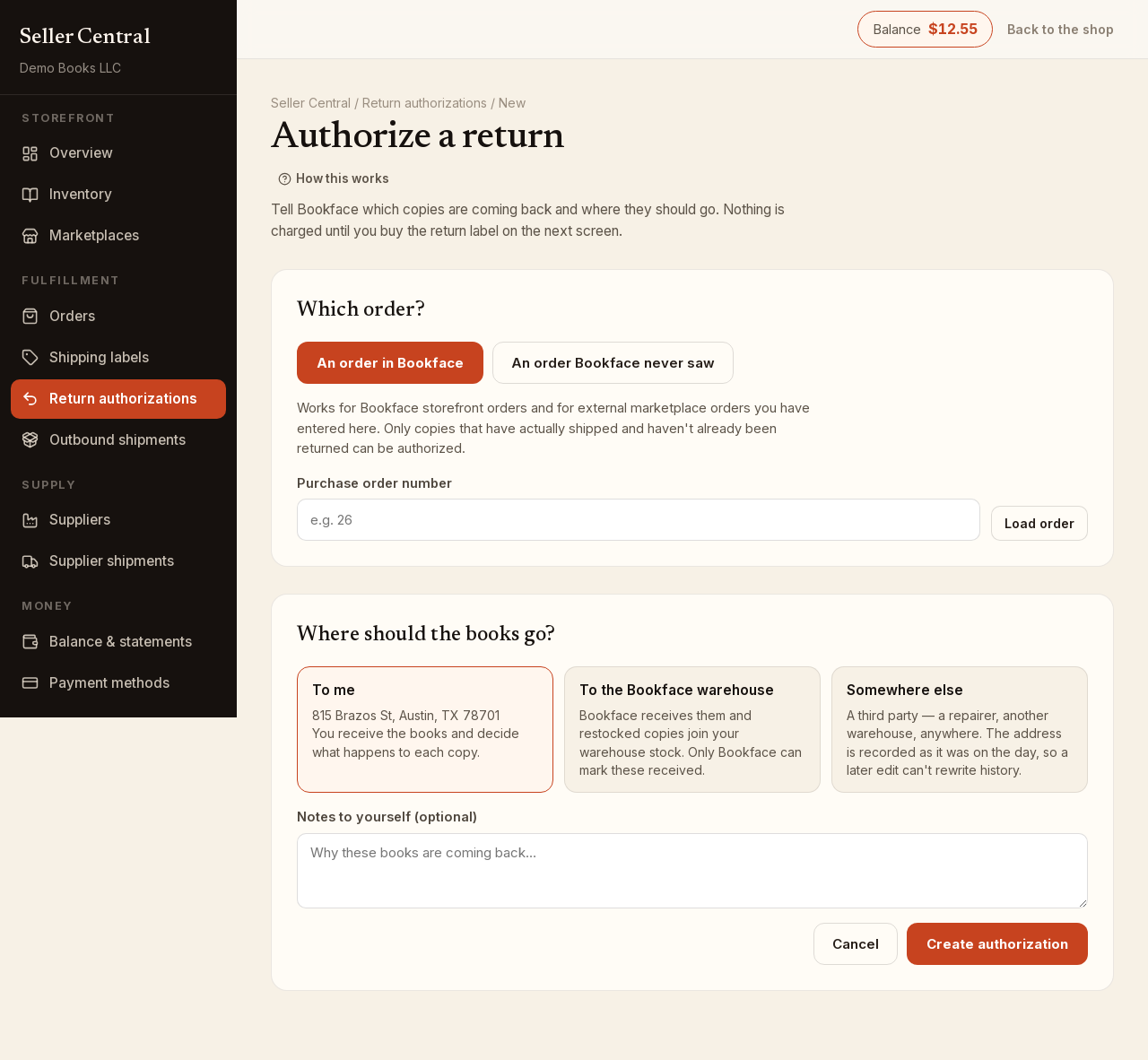
Create the authorization
- Open Return authorizations and click New authorization.
- Under Which order?, choose:
- An order in Bookface: for a Bookface order or a marketplace order you have entered. Type the Purchase order number, click Load order, and tick the copies coming back. Only copies that have shipped and are not already marked returned can be picked.
- An order Bookface never saw: for dropshipped or off-platform sales. Enter the Marketplace and Their order reference if you have them, then the buyer's name, address, Phone (required) and Email (optional, but without it we cannot email the label). Under Which copies?, give one line per book: an Inventory id, or an ISBN-13 with Condition and Price and we create the listing. Click Another copy for more lines.
- Under Where should the books go?, pick To me (your registered address), To the Bookface warehouse, or Somewhere else with a name and address.
- Add Notes to yourself if useful and click Create authorization.
Buy the return label and email the buyer
The authorization opens on its own page.
- In the Return label card, choose the Service (USPS Media Mail, Ground Advantage, First-Class Mail, Priority Mail or Priority Mail Express), the Package type and the Weight (lb). We fill in a weight from the books; change it if you know better.
- Click Buy the return label. It is paid from your balance, with no picking fee.
- Click Email the buyer. The email says what to send back and where, and includes the label link. It needs an email address on file for the buyer.
Open label shows the label itself; Refund it takes you to the Shipping labels page to refund an unused one.
Record what arrived
When the books come to you or to the address you chose:
- Tick This copy arrived on each copy in the box.
- Choose what you did with it: Restock (sellable; adds one back to your stock), Discard (arrived damaged; nothing goes back into stock) or Wrong item (not this book; note what actually turned up).
- Click Record what arrived.
Two copies of the same title can get different answers. When every copy is resolved, the authorization shows Completed. If the books are going To the Bookface warehouse, we receive them and add restocked copies to your warehouse stock; you cannot mark them received yourself.
Cancel an authorization
Click Cancel this authorization while it is still In progress. If a label has been bought and not used, refund the label first. Once the buyer has posted the label, the authorization can no longer be canceled. Copies already received stay received.
The list page filters by In progress, Completed, Canceled or All.