
Enter an order from another marketplace
Record an Amazon, eBay or other sale in Seller Central so it joins your queue, comes out of your stock, and ships from Bookface when we hold the copy.
An order you took somewhere else, on a marketplace, by phone or at a stall, belongs in your Orders queue too. Entering it takes the copies out of your stock, and any copy we hold in our warehouse ships from Bookface.
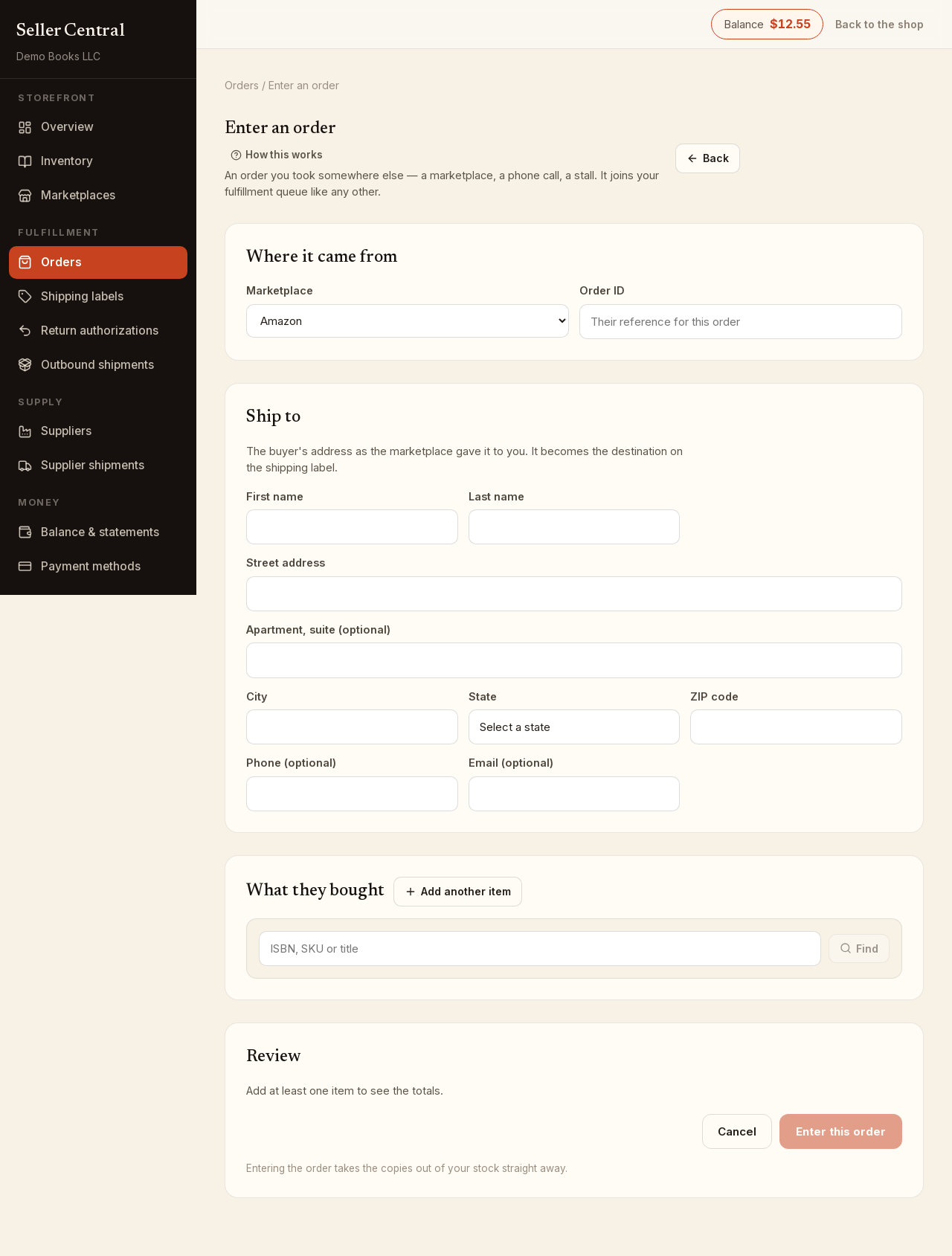
Enter the order
- Open Orders and click Enter an order.
- Under Where it came from, choose the Marketplace (Amazon, Abebooks, eBay, Alibris or Other; Other asks Which one?) and type the Order ID, the reference that site gave the order.
- Under Ship to, enter the buyer's address exactly as the marketplace gave it to you: First name, Last name, Street address, Apartment, suite (optional), City, state, ZIP code, and optionally Phone and Email. This address goes on the shipping label.
- Under What they bought, type an ISBN, SKU or title and click Find. Pick the listing from your inventory. If nothing matches, click Add it to your inventory and fill in the ISBN, condition, price and copies on hand.
- For each line set the Quantity, Unit price, Unit shipping and Speed (Standard, Expedited or Express). Click Add another item for more lines.
- Check the Review section, then click Enter this order.
The copies leave your stock the moment you enter the order, and the order appears in your Unshipped list.
Which copies ship from Bookface
Under each line you will see either Ships from you or, for example, 2 ship from Bookface, 1 from you. Stock we hold in our warehouse is always sold first, on every order, whichever site it came from. We pick, pack and ship those copies, and your balance is charged the postage and picking fee when the label is bought. The Review section repeats this when any copy ships from Bookface.
If a line asks for more copies than you have, the page says so and will not enter the order until you lower the quantity, add stock, or mark the line dropshipped.
Dropshipped lines
Tick Dropshipped — I'll buy this copy from another seller on a line when you will buy the copy after the sale instead of shipping one you own. No stock is checked or used for that line. See Dropshipping.
Entering the same order ID twice
If you have already recorded that order ID for that marketplace, the page refuses and shows a checkbox, Enter it anyway. Tick it only when it really is a second, separate order.
Fixing an entered order
Open the order from the Orders list. On an order from another marketplace you can edit the site and order ID, the buyer, each line's condition, SKU and description, and each copy's price, shipping, speed, carrier and tracking.