
Your balance and statements
What goes into your balance, what comes out, how statements close on the 1st and 15th, and how to add funds for postage.
We keep a running account for you. Sales proceeds go in; commission, refunds and postage come out; what is left is paid to you on the 1st and the 15th. The Balance & statements page shows all of it, and the current balance sits in the top bar of every Seller Central page.
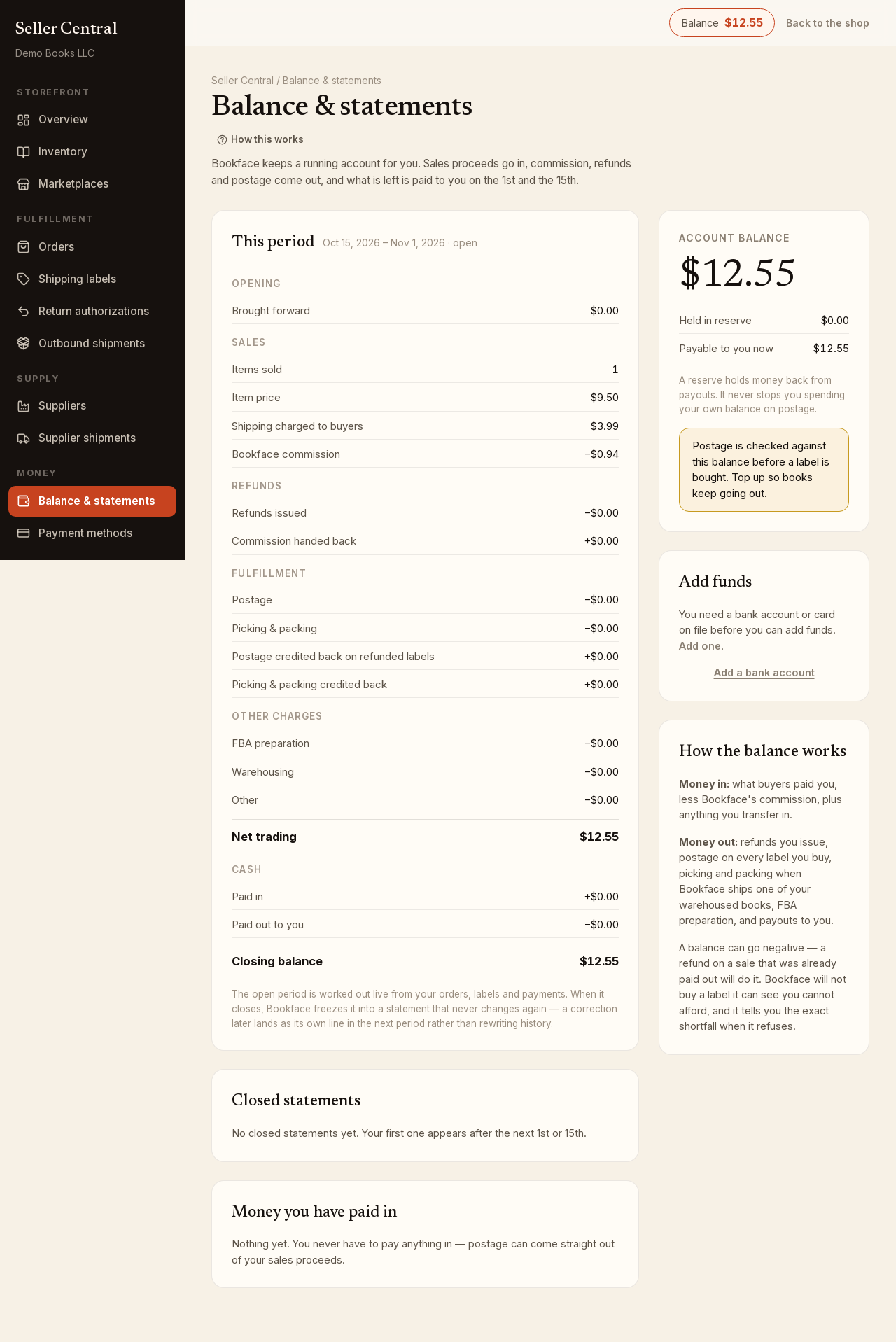
How the balance works
Money in: what buyers paid you, less our commission, plus anything you transfer in yourself.
Money out: refunds you issue, postage on every label you buy, picking and packing when we ship one of your warehoused books, FBA preparation, and payouts to you.
A balance can go negative, for example a refund on a sale that was already paid out. Postage is checked against the balance before a label is bought; if it cannot cover the label, the page tells you the exact shortfall.
The Account balance card also shows Held in reserve, money held back from payouts, and Payable to you now. A reserve never stops you spending on postage.
This period and closed statements
The This period card is worked out live from your orders, labels and payments. It lists the opening balance; sales (Items sold, Item price, Shipping charged to buyers, Bookface commission); Refunds issued and Commission handed back; Postage and Picking & packing, with credits back on refunded labels; FBA preparation, Warehousing and Other charges; Net trading; cash Paid in and Paid out to you; and the Closing balance.
A period runs from the 1st to the 15th and from the 15th to the 1st. When it closes, it is frozen into a statement that never changes; a later correction appears as its own line in the next period. Click a date range under Closed statements to open the figures and Paid out against this statement, which lists each payout's date, method and amount.
Money you have paid in lists every transfer you have made. You never have to pay anything in; postage can come straight out of sales proceeds.
Add funds
For more postage headroom than your sales provide:
- In the Add funds card, choose From: a verified bank account (no fee) or a saved card (a 3% processing fee is deducted from what lands in your balance).
- Enter the Amount.
- Click Transfer from my bank or Pay by card.
A card payment is credited at once. A bank transfer takes a few business days, and your balance goes up when the money lands.
Add or verify a bank account
Click Add a bank account, then Connect your bank to sign in at your bank; most accounts are verified in seconds. Or click Enter account details by hand instead and fill in the Account holder name, Routing number, Account number, Account type and Held by. Accounts entered by hand are confirmed by small test deposits; when they arrive, click I have the deposits — verify now and enter the two amounts or the code starting SM from your statement. A transfer from an unverified account is declined.
Bank accounts and cards are also managed on the Payment methods page.